Categories
For the Geeks

Let Them Come, For Frostmourne Hungers

The new patch 3.3 from WoW

Let’s keep it real.  Who am I – a regular dude who has a full time job with little time to invest in character development and elite raider networking – to dream of defeating the Lich King?  I reckon it would be a lot easier for me to get the S$1,288 life size legendary sword Frostmourne than the one in the game.  Fulfilling the fantasy of getting up close and personal with the Lich King in his dungeon aside, the new patch 3.3 has a lot more to offer.  Top of my list: the new Dungeon Finder.  The 5 icons below from left to right indicate if the roles of the tank (i.e. damage taker), the healer, and the three damage dealers have been filled.  In the case below, the game was still finding a tank for us.

Assembling a group of 1 tank, 1 healer, and 3 damage dealers now is a breeze

I think I can speak on behalf of my brothers and sisters in the World of Warcraft.  Two things suck being an Asian player in an American server (or we refer it as ‘realm’).  First, servers are down for maintenance on Tuesdays, off-peak hours in America but prime time evening hours in Asia.  8 to 10 hours, often to be.  Second, assembling a group of 5 to venture into a dungeon during Asian prime time used to be hard because most of the players are still sleeping (the Americans) or have gone to bed (the Australians).  Cynthia and I could spend 1 to 2 hours spamming the looking-for-group channel and we could end up going to bed not visiting any dungeon at all.  I reckon most players simply level their characters through questing.  But questing day in day out could drive us mad.  When we heard that the new Dungeon Finder is out, we were dying to give it a shot.

The new x-realm Dungeon Finder

Seriously, what took Blizzard so long to implement the idea of pulling players from different realms into a group for dungeons?  Especially for some of us who have such difficulty in looking for players for dungeon outings, any dungeon outing.  It turns out that to make this idea works is a pretty complicated matter not only from the technology point of view.  Here are our observations.

  • Finding a random group for a random dungeon seems fast.  At times within minutes.  That is great.  As expected, healer and tank remain as the hardest to come by.  Everyone wants to be a hero, to kill something.  No one seems to enjoy taking a beating or keeping people alive!
  • Exiting a cross-realm dungeon brings us back to the exact location of where we were prior to joining the dungeon.  Imagine being able to continue questing right after visiting a dungeon.  Also, once outside the dungeon, we can teleport back into it at any time.  That enables some of us to stock up reagents, poison, and to repair our gears.  Very nice!
  • There are rewards to be earned.  Did I mention a random rare pet Perky Pug that may drop?  There is also an extra buff that makes your random pick-up group (PUG) stronger.  But hey, if the group sucks, not even those 5% extra of this-and-that can save us.
  • Some players do suck.  Maybe Cynthia and I too suck.  Since now that we cannot ‘interview’ our team members prior to them joining our group like I used to (cross-realm conversations are normally not possible), we have to rely on luck to get the players who know at minimal how to play their class.  And more often than not, luck was not on our side.
  • OK.  That may be due to the fact that everyone are still trying to get used to the new interface that comes with the new patch (that new camera!), trying to cope with the absence of outdated mods (I miss my damage meter).
  • And / or because many players who have not had a chance to experience dungeons regularly have no idea what they should do inside a dungeon.  Now they can.  But skills are not built overnight.  I hope in time to come, players do get better.
  • Because of that, many players deserted our group and we constantly needed to go back to the queue and look for replacements.  Fortunately, the wait was not long, although I can’t say that it was a thoroughly enjoyable experience.  Deserting a group should be discouraged or further penalized by the current 15 minutes ban before re-joining the queue.  What happens to patience and mentorship, friendship building and peace?

Nexus, completed via Dungeon Finder

We did complete one dungeon, after numerous change in players and dungeons.  We could have finished a higher level dungeon had the server not needed a restart (we nearly completed Azjol-Nerub in 15 minutes!).  I think more fine tuning of Dungeon Finder is certainly needed.  And I trust Blizzard on that.  Below is a trailer for this new patch 3.3.

Update: On the next day, Cynthia and I took our characters to yet another random dungeon after spending an entire morning researching on how to play better (this link is no joke).  That random dungeon was tough!  But we had a good group.  Nobody dropped out (thank God!).  It was worth the wait (about 20 minutes to assemble the group).

Ah ha! Another complete.  This time is the dungeon OK.

Categories
For the Geeks I See I Write

Nokia E72 – And The Wait Is Over

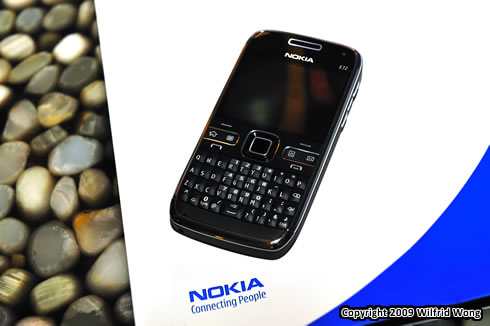
The Nokia E72

I have friends who swear by the Eseries (while I am more of a Nseries dude).  When the E75 was out, I asked one friend of mine if she would get that but she got the E71 instead.  Why?  I suppose having the full QWERTY keyboard right underneath the screen does have its appeal, a design without a need to slide out the keyboard.  Knowing that I would attend this Nokia event, I did some homework, ‘interviewed’ my friend and got to know a bit more about Nokia Eseries.

Now that I have touched and felt the new E72, I can understand why my friend – in her own words – loves the Eseries.  For those who are constantly on the go and need an efficient phone and messaging device – both email and instant messaging (and also social networking), the Eseries is optimized for just that.  There are dedicated buttons on the E72 to quickly access the calendar, contact, and messaging functions.  Holding one of these buttons create a new calendar entry, a new contact, or a new message (imagine if my N97 has that!).  There is a button to instantly return to the home screen too and by holding it, you can toggle between various opened applications.  At the center of the phone is the new Optical Naviâ„¢ Key.  It senses the motion of your finger (or thumb) as you scroll your long emails up and down.  And you can use that key to scroll through any onscreen items.  From my brief experience, it feels responsive.  And I do like the keyboard design too.  The common punctuation symbols are easily accessible, a different experience I have with my N97.

In fact, the entire phone interface feels responsive thanks to the Symbian S60 3rd Edition operating system.  For those who are already using E71, this could be a worthwhile upgrade for the following reasons.

  • 5 mega-pixel camera
  • 250MB internal memory and supports up to 16GB microSD memory card
  • 3.5 mm audio connector (now you can use the standard earphones)
  • Able to synchronize calendar items to Outlook (on top of emails and contacts that E71 is able to)
  • Better battery performance
  • Slimmer design

And for those who are curious about the key features of email and instant messaging, on email, E72 supports Mail for Exchange, IBM Lotus Notes Traveler, Nokia Messaging service (lifetime license), and POP/IMAP.  On instant messaging, it supports MSN, GoogleTalk, OVI Chat, Y! Messenger, and more.  E72 is now available in Singapore selling at a RRP of S$750 (excluding operator plan and GST).  If you have questions for Nokia, please drop me a comment here or send me an email.

*     *     *     *     *

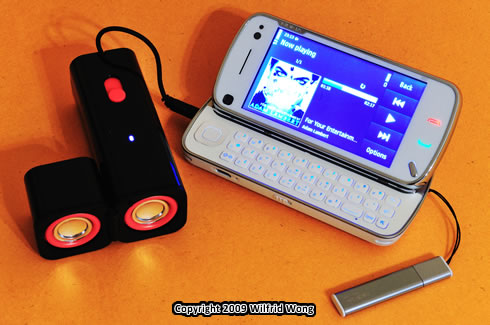
I have always enjoy blogger events hosted by Nokia and Text100.  And I had such a great time catching up with old friends, making new friends.  During the event, there was a little contest that involved a bit of instant messaging using the new E72 and a bit of creativity.  Shocking to me, I won this little Nokia Mini Speakers (MD-6).  I have no idea if Nokia does sell those little beauties but had I known such thing exists, I would certainly have bought them long ago.  Great for traveling (comes with a pouch).  And great for playing music in the bathroom while showering too!  These are active speakers taking in 4 AAA batteries.  Definitely better sound quality than the phone speakers, a design more geared towards the XpressMusic series.  So this looks really good pairing with Cynthia’s XpressMusic 5800 than my N97.

What a lovely gift!

Categories
For the Geeks Game Reviews

Almost 5 Years – A World Of Warcraft’s 5th Anniversary Inspired Post

A typical WoW screenshot in action

Yes, what you see here is a typical screenshot Cynthia and I see when we play an online game together, a massive one that players from different parts of the world gathered online.  Looks complicated but it is like driving.  After a while, it is second nature.

It’s been 5 years since World of Warcraft was launched.  Nov 23 was the date.  Wow!  Think about the subscription fees I have paid.  US$12.99 per month to be exact.  I have been their faithful subscriber since Feb 2005, when the game finally arrived in Singapore.

I am not disillusioned.  I know what is real, what is not.  There was a period of time when concerning family and friends tried their best to keep me in check, against game addiction.  I suppose if one spends too much time on something, not able to find time to do something else with someone else, collective wisdom would say: that’s no good.  And if one spends too much time on something that majority of people do not understand, collective wisdom would say: that’s even worse.  How about if one spends too much time on something that majority of people understand (or think they do), what would collective wisdom say?  Here are my thoughts.

  1. Most of us have a letter of employment that says we are paid from 9 to 5.  But yet some of us pour in more hours for no tangible outcome.
  2. Most of us are convinced that we build useful skills as our career progresses.  But how useful are these skills as time goes by?
  3. Most of us have our eyes on promotion, having a new title.  But what does the title really mean outside your office?
  4. Some of us claim that never mind the long hours because we have fun at work.  How much of those juicy war stories really mean anything to someone who is not of your work domain?

What I am trying to say is that, you too are in your own world.  Everybody does.  We all have our passion and obsession, in different forms.

*     *     *     *     *

That dragon, earned it with blood and tears.

In celebrating the 5th anniversary of this one great game, fans are recounting and sharing their World of Warcraft moments online.  Hence, this post.

All Levels Begin With Number 1 (Before Death Knights Ruined It All)

The very first moment logging into the game was magical.  I was an elf.  My buddy Mark was too an elf.  Every moment in the game was new, and breathtaking.  How many of us in reality can look through the routines and find something fresh, and exciting?  Like every moment is a moment of discovery?  That mysterious forest; those spiders that killed me again and again.  Ah, good old level-lowbie.

Our Town Is Attacked Again (And Then Honor System Came And Vanquished It All)

In the good old days, opposing fractions often raged war against each other’s towns.  The first time I participated one was exhilarating.  Opposing fractions would form a long line facing each other, stayed out of each other’s attack range (much like the movies of the ancient wars), waiting for the number to gather.  Reinforcement flew in as news traveled fast.  Lots of taunting and luring to start the battle.  At a critical moment, someone would rally a group and march into the enemy line.  And then, the battle began involving easily more than 50 players.

As the attack progressed, it often broke into smaller battles amongst small groups (has anyone played the ‘egg and flour’ war in say birthday parties?).  I once thought that I was safe hiding behind a tree resting.  In the next moment, I saw 5 or 10 of them in front of me out of nowhere.  Uh oh.

The side effect of these unintended episodes was that not only did players take down other players, but they also took down the guards, the pheasants inside the town, basically halted all kinds of questing for those who wished to stay out of conflict.  So, the creator of the game has decided to take the battle out and into designated areas.  I miss those large scale town raiding.  Or as a matter of fact, being raided was just as fun.

General Drakkisath (In The Good Old UBRS)

The first time tackling the dungeon in a group of 15 online players was, as I remember, nerve-wrecking.  Raid leader’s commands were streaming through the chat window in the form of text.  Everyone followed order, for every maneuver inside the dungeon.  Flawless execution like an orchestra that all musicians play a different instrument, but the same song.  The quality of leadership and the bravery of the group was inspiring.  Although in much later, I too led groups to tackle different dungeons, although as time goes by there are newer and more complicated dungeons, I still hold dear to my first memory of the dungeon UBRS.

No, we didn’t kite General Drakkisath during my first encounter.  That strategy was derived much later, I think.

It Is Level 1 To 60, Or 70 Once Again (For The Horde!)

By the time Cynthia joined me, it was 2007.  First expansion of the game was out and she was attracted to the beauty of the new race blood elf, curious about what got me so into the game (I remember we had a bet or something).  To someone who has 8 level 60 characters back then, it is all the way from the beginning again.

Interestingly, Cynthia is my antidote to game addiction.  Because of character progression, there is little point in getting ahead of each other.  We complete quests together, visit dungeons together, and play the game together till today.  If she doesn’t play, I don’t play.  Simple as that.

Self-Actualization (For Now Before Expansion #3 Arrives)

2009 is an interesting year.  The game has evolved in a way that it is now much easier to attain “self-actualization”, even for the casual players.  Cynthia and I are now able to work towards improving our characters beyond the level cap tackling dungeons in heroic mode side-by-side with the serious players (or raiders).  We are exalted in major factions riding dragons (see picture above) and collecting exotic pets, collecting in-game titles.  We have a good pile of gold coins stashed up somewhere.  In short, all that we have ever wanted – given the real life constraints we have – we have.  These days, we rarely play, maybe a couple of times a week.

And when expansion #3 arrives, it will be all the way from level 1 once again …

Oh yes, happy birthday WoW.

External Link: World of Warcraft Anniversary Site

Categories
For the Geeks Photography

SanDisk ExpressCard Reader for CompactFlash Cards – Speed Tested Here, And It Is Fast

SanDisk ExpressCard Reader for CF Cards

“Come to think about it, what you are holding is quite a rare thing.  I have not heard of a ExpressCard reader for CF cards,” said one photography friend of mine.  To recap, I have tested the new SanDisk Extreme Pro here.  I love what the new card can do.  That got some of my photography friends excited as well.  But the top question from the crowd was: Hypothetically speaking, if we had the 64GB SanDisk Extreme Pro card, how long would it take to download the photos?  On a USB 2.0 connection like mine, the answer is 3 hours.

When I am on my overseas holiday, I always back up my photos daily onto my old laptop (and I make another backup on another external hard disk).  Transferring photos via the USB 2.0 seems like a pain, at least to me.  Even as I delete off unwanted photos during the shooting session, I may still end up with 4GB worth of materials.  That is 12 minutes of photo download, from the memory card to my laptop, using my laptop’s precious battery power.  But that is only for a holiday trip.  I can imagine for the professional event or sport photographers, they would have shot a lot more photos a day, required to transfer a lot more photos a day into the computer for processing.  Any time saving for these professionals could mean a lot.  In fact, I once covered a media event.  And I ended up with tons of photos that evening.

So, just how fast is the SanDisk ExpressCard Reader?  To cut a long story short, by my testing, this reader reduces the download time by 70%.

*     *     *     *     *

One day SanDisk called me and asked if I am interested to test out the new ExpressCard Reader for CF cards.  I said yes in a heartbeat, excited about the opportunity to touch and feel this loaned unit.  When the excitement subsided, there was one minor logistic challenge – I don’t have a laptop that has an ExpressCard slot!

Panic, and I began making contacts with my friends and asked if I could borrow their laptops for a timed experiment.  Interestingly, while not all laptops in this world has an ExpressCard slot, quite a few do – both Windows OS and Mac OS.  In fact more than I have anticipated.  So, a big thank you to my friends who have responded and especially those who are so keen to loan me their laptops for testing on something they have no idea what it is all about.  You guys rock!

Although my sister’s [pretty high end] Fujitsu laptop is about 2 years old, it does have an ExpressCard slot.  In fact, Fujitsu began shipping that technology since mid 2005.  I am not technologically inclined and hence, it took me a while to correctly install the necessary software (or driver) and got the test going (and to correctly find the slot!).  Remember, only install the driver from the CD provided once you attach your card reader into your laptop preferably with a CF card inserted. Your Windows OS may tell you that your card reader is ready to be used.  But in fact, the speed can be so slow that it is not usable (6 times slower than USB 2.0 in my case when I incorrectly installed the driver).

For my simple test, I use 40 real life photos in 14-bit RAW format.  That sums up to about 500MB worth of photos.  I preformed the test on both the new SanDisk Extreme Pro (90MB/s) as well as my old SanDisk Extreme IV (45MB/s).  The result is the same.  Upload of photos (i.e. write speed) via the card reader took 20 seconds.  Download of photos (i.e. read speed) took 26 seconds.  For comparison, download via USB 2.0 took 86 seconds.  To extrapolate, a 16GB worth of photos would take less than a quarter of an hour to download using this card reader.  That may seem long, but imagine the alternative option I am currently having (and how precious laptop battery power is).  If download time can be cut by 70%, that is awesome.

So who needs this?

Professional photographers or enthusiasts who have a laptop that supports ExpressCard, consider the time saving (and power saving for the laptop on battery), it is certainly a worthwhile investment.

Note: SanDisk proposes that I should use either a MacBook Pro with ExpressCard slot or Sony VAIO VGNCR220E for testing.  Unfortunately, I am unable to secure any of these two types of laptop at the time of testing.

Categories
For the Geeks Photography

SanDisk Extreme Pro, In Fire And Ice We Trust

SanDisk Extreme Pro ... 90MB/s!

I love photography.  And it is not everyday news that you wake up one day discovering that the product you use has a new model is double as good.  I am a proud user of SanDisk’s Extreme IV CompactFlash cards for my Nikon D700.  It was their top of the line product trusted by the professional photographers.  Then comes this new Extreme Pro.  The maximum capacity has doubled to a jaw dropping 64GB.  The read and write speeds have been boosted up to 90MB/sec, double of my Extreme IV cards.  That is shocking, on paper at least.  But how does the card perform?  Well, here is a little test I have done on a lovely Sunday morning.

Simple Test Setup

The three memory cards on the tests are (1) SanDisk Extreme Pro (90MB/sec), (2) SanDisk Extreme IV (45MB/sec), and (3) Lexar Professional (300x speed).  SanDisk cannot test with their competitors’ products, but I can.  To be fair, all my cards – including this new review unit from SanDisk – are pretty respectable, in terms of performance, reliability, and durability.  SanDisk has provided me with some testing procedures.  But I prefer to test it under a real life scenario.  So, below is my setup.

If you take single shots, it does not matter too much if you memory card is fast or not too fast.  Though once, a friend called me up and asked, “You told me to shoot in RAW but it is just too slow to take one photo!”  I wanted to pull a fast one on him and tease him that his is not a Nikon, like I have advised him to buy.  Instead, I told him that his memory card maybe too slow.

In this test, I put my camera on continuous shooting mode.  I chose a slow 3 frames per second for my Nikon D700.  Simply because any higher it would be difficult for me to count the shots.  I switched off as much post processing of the photos as possible in order to put extra emphasis on the memory card performance (and in real life too, I switch them off for high speed shooting).  Of course, no image review.  Who would care about image review in sport shooting scenario?  During each test, I shot 40 photos.  And I shot in 14-bit RAW, which is higher than the rather common 12-bit RAW format.  I resisted shooting in RAW+JPG because (1) I seldom do that and (2) converting RAW to JPG takes time and may alter the result.  RAW is good.  It is what I shoot.

To recap: 3 memory cards, 40 shots, 14-bit RAW, 480MB of data, one camera.

Test Results

Lexar Professional (300x speed) – On paper, this card has a similar speed the Extreme VI that I own.  The entire 40 shots took 22 seconds to complete the transfer from the camera buffer into the memory card.  However, after 30 shots, my camera slowed down and the frame rates dropped way below 3 frames per second.  That is disappointing of course, although I was not surprised.

SanDisk Extreme IV (45MB/sec) – My bread-and-butter, these are the cards that I am happy to spend money on.  40 shots took 21 seconds to complete the transfer with no slow down to my frame rate. An additional 8 seconds to complete the process (40 shots should take about 13 seconds to complete using 3 frames per second setting).

SanDisk Extreme Pro (90MB/sec) – Less than 15 seconds was what it took to transfer all 40 photos (total of 480MB).  In fact, the write speed of the card no longer seems to be a limiting factor (the entire shot of 40 photos took more than 13 seconds to complete).  For the testing of this particular card, I have increased my number of shots to 100, almost instantaneously, all the shots are stored.

Afterthought: For my 12.1 megapixel full frame camera, it seems that SanDisk Extreme Pro is all I need.  I could of course up the frame rate from 3 to 8 per second (which I may if I can find a suited theme for my next photo shot).  One participant at the media event has maxed out his Nikon D3 camera buffer in continuous shooting mode and it takes 130 shots to do that, with this Extreme Pro card.  I doubt if I would be that extreme.

Who Needs This?

Although my test centers towards speed, SanDisk Extreme Pro has lots to offer too.  The card works in an extreme temperature range of -25°C to 85°C (hence the picture and the title if you get the drift).  It is designed to be durable for humidity and accidental drops too.  In terms of reliability, it uses a wear leveling technology to spread the data across different blocks of memory so as to maximize the lifetime of the card.

For those of you who have to have the largest capability available (e.g. sport photography and underwater photography), the 64GB version is too good to be true.

And for those who want to tap onto the potential of a higher speed, your camera needs to be able to utilize the UDMA 6 technology.  My contact in Nikon has informed me that all their high-end cameras – D3x, D3, D700, and D300s – are able to support UDMA 6.  It appears that Canon 5D Mark II and Canon 50D are able to support that too, though I have no means to verify.  As the image size getting bigger and more photographs elect to use their dSLR cameras to film HD videos, write speed of a memory card becomes a crucial attribute.

If you own a high end camera(s), you really need a memory card of a similar caliber to match.  For more information on technical specifications and pricing and etc., please click here.

PS. I have not tested on the download speed as the card has gone beyond USB 2.0 speed.  But I reckon the speed would be amazing, judging at what I have seen so far.

Categories
For the Geeks

Latest Nokia Application Review – Part 1 of 2

N97 on Nightstand, photographed this morning

For the second time this year, Nokia has passed me some credits to try out applications of my choice at their OVI Store.  This is exciting of course.   Although some I would have bought anyway, it is good to test out others that I would have missed.   The size of the store has grown quite significantly over the last few months, especially in the gaming section.  Many of the real good applications and games come free of charge.   Part 1 of this review focuses on standard applications.  Part 2 will focus on games.  Some of the games are so fun that kept me going night after night.   Stay tuned for that.

On the standard application front, more similar – either competing or complementary – applications start to emerge.  It is interesting to see how some applications are sluggish and unappealing while a similar one with very similar functionality is blazing fast, looking stylish and professional.   Same Nokia Symbian operating system, very different in performance.  And it is also good to see applications continue to push the frontier of what a Nokia phone can do.

I use a N97 to test out some of the noteworthy applications.   If you or your friend owns a Nokia phone or intend to own one, I hope you enjoy reading this part 1 review as much as I writing it.

To continue reading, please click here.  For more articles on this particular phone model, you may also wish to check out the “Experiencing Nokia N97” page.

Categories
For the Geeks

Norton Internet Security 2010 Is Here!

The front of Norton IS 2010

I genuinely buy into the idea that there are people out there who are going all out to make our lives miserable for profit, and for pride.  I run a website having to deal with hundreds of spam comments each day that come with thousands of dubious links.  And I wonder: Why are there people out there doing something so unproductive affecting millions of people every second of the day?  The reality is, these people not only want to disrupt your life by destroying your data, but also want to steal your identity in order to make money.  I have had the opportunity to attend a workshop held by the Norton team July this year.  The threat is real.  It is not a question of “are you protected”.  Rather, how well are you protected against the ever evolving threats.  Instead of telling you what Norton Internet Security 2010 is, here are the reasons why I choose the Norton product and want no less.

1. The Power of Community Insight to Tackle the Unknown-Unknown

Years in the making, Norton has established a community network to tackle not only the black and white, but also the gray area.  As seen below, the fingerprints of more than 66 millions files (note: NOT the actual file) have been submitted to Norton by the community.  We know what are the good ones, the bad ones, and what are the ones that trust is yet to be earned.

Think about this.  With the ever growing list of viruses, spyware, trojan horses, worms, bots, and rootkits, it seems counter productive to scan every file in your computer all the time.  So, the concept of a community insight is to share the knowledge amongst the Norton users and skip those trusted files in your next scan.  Reputation of unknown files are built that way too.

To tacklet the unknown unknown

2. Working Silently in the Background

One thing I really like about the new generation of Norton products is that they work behind-in-scene without much interaction and disruption to your work.  The moment I step away from my computer, Norton will scan my computer in the background.  The moment I grab my mouse, the scan will be paused and resumed the next time I make my cup of coffee.  Every so often, there is a pulse live update to make sure that my computer is protected with the very latest update.  For the tech experts out there, the memory footprint of Norton is only less than 10MB.  To give you an idea of what it means, Microsoft Live Messenger utilizes 30MB of my computer’s memory.

3. Feel Safe Surfing the Web

When you Google something going through the search results, how do you know which ones are safe to click onto?  With this Norton product, now you can.  Just take a look at the picture below, the little green ticks mean OK to click onto (thank God!).  For malicious sites, you will be warned.  Do note that there are sites out there that may hijack the real ones, look like the real ones.  That too can be detected by this Norton product.

Google my own site ...

You can also turn on the parental control function if you have kids at home (not me!).  And this Norton product also offers to store the user IDs and passwords for you.  I prefer to use my [physical] personal diary to keep track of all my user IDs and passwords.  Just so that I may still remember them when I am not using my home computer.  These functions may be relevant to some.

Other Thoughts

I am a simple dude.  I just want an industrial standard tool to protect my home computers from online threats.  You may also wish to know that I have tried out their online support recently.  It was kind of cool.  The Norton service consultant actually took control of my computer thousands of miles away from my home.  All I needed to do was to stare at the computer screen and ‘monitor’ how the consultant resolved my problem.  I am impressed by his or her professionalism (though I nearly fell asleep halfway).

Also comes with Internet Security 2010 are a few tools to monitor the network security as well as the application ‘trust’ ratings.  As of now, they are of less use to me.  But I would suppose these tools would come handy when I become paranoid and want to see if there are some strange applications running in the background, or a stranger is logging onto my network.

Many friends whom I talk to often ask me how much it costs to run Norton products at home.  Below is from the official source.  And of course, I take no commission.  How nice if otherwise!  Do drop me a comment or write to me if you have questions.  I may be able to get you an official response.

The suggested retail price for Norton Internet Security 2010 is SGD89.00 for a three PC license and SGD59.00 for a single PC license and for Norton AntiVirus 2010 is SGD65.00 for a three PC license and SGD39.00 for a single PC license.  The price includes one-year service subscription to use the product and receive Symantec’s protection updates.

Categories
For the Geeks I See I Write

So, Honestly, What Is It Like With The Nokia N97?

Home Screen of Nokia N97

In a world today whereby every other touchscreen phone is a Blackberry or an Apple, I certainly feel somewhat special by having the new Nokia N97.  Strangers would come up to me and ask what is it like with the N97 (as I use my phone often in public).  Like in NTUC, while I was doing grocery shopping with my family.  Or like the lady behind the mixed rice counter in a food court.  Or my colleagues whom I normally wouldn’t interact with would come up and strike a conversation with me.  Some ask for the tips of using the phone.  Some simply like many others curious of what this new flagship product is like.  For them, I am more than happy to do a live demo, there and then.  Making friends.

Throughout this six weeks, I have experienced quite a fair bit with the phone.  I have also had quite a few good opportunity to play with my friends’ Blackberry and Apple phones.  By no means the following article is meant to be a product comparison, or even a product review.  Just an honest write-up on my hands-on experience with the N97 thus far.  And if you are already a N97 user (or going to be), you may find a few good tips too.

So, are you ready?

PS. If you are shopping for a phone, make sure you work out the total cost of ownership over the contract period.  My 30GB data plan is S$13 a month just to give you some ideas when you examine the bundled price of any given phone.

Related Article: Experiencing Nokia N97

Categories
For the Geeks I See I Write

21 Nokia Applications Reviewed, Just For You

Nokia Applications

Over the last few weeks, I have been busy experiencing the different applications on my Nokia N97 wireless phone.  Most are free, some require purchase that settled via the phone bill.  Of more than 40 applications I have downloaded and tried, I have singled out 21 applications to share my thoughts with y’all here in my website.  Of which, 10 are my top favorite ones.

Maybe you are curious on what our world is like, maybe you are trying to decide if Nokia Application is your cup of tea.  Either way, I invite you to take a look at the review by clicking onto the link below.  Some applications are pretty interesting.  If you already have a Nokia phone, I hope this review will help you in deciding which are the good applications out there for you.

So, are you ready?

Related Article: Experiencing Nokia N97

Categories
For the Geeks

Norton Inner Circle: Getting Ready for Norton 2010

Norton Productions

OK.  Exactly how do I get recruited into the Norton Inner Circle, I cannot recall.  Maybe I am an excellent specimen who needs extra … protection.  Or maybe I am one crazy beta tester who is willing to surf porn dubious sites on a holy mission.  6.30 pm sharp I turned up at the Pan Pacific Hotel.  I recognize quite a few familiar faces (like Lester!) and was ready for an intensive knowledge download all the way till 10pm.

Gasp!

But I am really glad to be at the event and hear the experts from Norton who flew in all the way from US and Australia and meet with the media and those in the business for a couple of days in Singapore.  This is the team who is behind monitoring all the threats from the world’s malicious hackers.  They are also behind the development of the upcoming Norton products.  I am not technologically inclined and the number one burning question I have was …

Who get to come up with all the cool computer virus names like W32.Koobface.C or Bloodhound.Exploit.264?

The statistics are mind blowing.  In year 2002, there were about 20,547 different kinds of viruses and threats.  5 years later, the number has grown to more than half a million.  This year, we have 2.5 million and counting.  An estimated 120 million ‘signatures’ recorded since 2002.  Imagine if each virus maker or threat originator was to plant a tree instead for each virus they create, the world would have been a much better place.  Think about all the added carbon footprint just to fix this virtual problem that in the past, these people did it for fame.  And now, for the money.

Plant trees, not viruses!

But fear not.  If there was no crime, we wouldn’t have police.  If there was no cybercrime, we wouldn’t have the big N to keep us cyberly safe.  Throughout the presentation, Norton has shared with us the history of computer threats and how they evolve.  Most of you are perhaps familiar with the need to have the anti-virus to scan our computers for known viruses and firewall to block attacks from the network.  Maybe less so on the vulnerability attack or intrusion through the ‘common doors’ we open for network communications and the chance for our computer to be zombie-fied and do it’s new master’s evil deed!  And because of the fake websites and applications that are designed to trick us into providing them with our personal information or even legitimate websites that are seeded with bad stuffs that automatically infest your computer by you merely surfing the site, the threat – to me – seems very real.  Cybercriminals ought to be punished, in my humble opinion.

Year 2009, Norton from Symantec has officially released the Norton Insight (read previous entry for my hands-on experience) that leverages on the community’s help in identifying what are the trusted files and what are not.  It is an opt-in program to send the footprints of the downloaded files to their lab for profiling with the rest of the community.  I opted in as I am cool with it.  No personal information is sent to Norton and they are not interested in the content of the downloaded files either.  For the past 3 years, millions have participated in this program to make our virtual world a safer place.  And so have I starting this year.

In this upcoming release, Norton takes it one step further and closes the gap on the gray area between what is trusted and what is not.  You will hear more from me later, perhaps next month.

Having seen the behind-the-scene on how the Norton team monitor the global threats (pretty cool with a war map like a computer game or what you would have expected Obama to see inside the Pentagon), the stringent key performance indicators on the performance (one of their senior VPs has mentioned during a BusinessWeek interview last August that Norton will not ship [their products] until they are the fastest in the world *gasp*), and how they upkeep with the product quality, I have decided to sign up as their guinea pig for the beta testing / preview of Norton 2010.

So what will I do as a guinea pig?  Norton didn’t give me much guideline.  Since I am a creative dude, what I will do for a start is to open up all my daily spam comments in my website (quite a lot), click onto each of the spam link and see if my computer would get an infection.  I always fantasize to be a cybernanny and ‘investigate’ on those dubious sites on a daily basis.  Man, this could be fun!  Wish me luck.